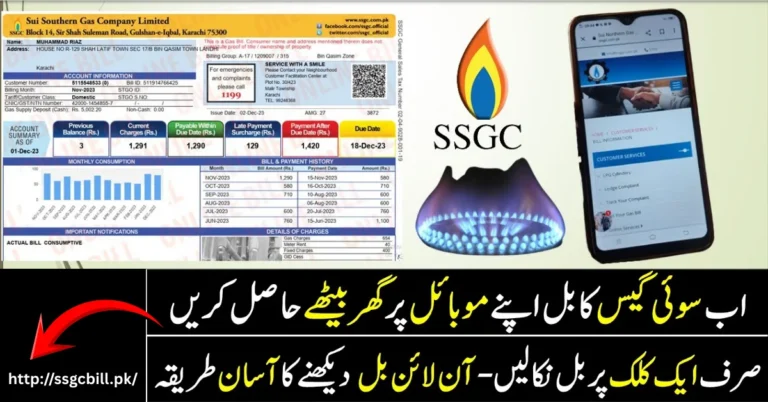
Check SUI Gas Bill Online: Complete Guide

Table of Content
Table of Contents
Check SUI Gas Bill Online to view your latest gas bill, check the payable amount, due date, gas consumption, and other billing details without waiting for the printed bill. In Pakistan, gas consumers are mainly served by SNGPL and SSGC, depending on their location.
Online bill checking is especially useful when your paper bill has not arrived, has been lost, or you simply want to know your bill amount before the due date. You can also download or print a duplicate copy when the online service provides that option.
What Is SUI Gas Bill Online?
SUI GAS Bill Online is a convenient service that allows consumers to access their monthly gas bill through the internet. Instead of visiting a gas company office, you can check your bill using the required customer or account information.
Your online gas bill may show important details such as:
- Consumer name
- Customer or account number
- Billing month
- Meter number
- Previous meter reading
- Current meter reading
- Gas consumption
- Gas charges
- Fixed charges
- Taxes
- Adjustments
- Total payable amount
- Due date
Checking these details online makes it easier to monitor your monthly gas expenses and keep track of your payment deadline.
How to Check SUI Gas Bill Online
The process depends on which gas company provides your connection. In Pakistan, consumers generally use either SNGPL or SSGC.
Step 1: Identify Your Gas Company
First, check an old gas bill to identify whether your connection is provided by SNGPL or SSGC. The company name is normally printed clearly on the bill.
Step 2: Find Your Customer Information
Take your previous gas bill and locate the customer number, account number, or other identification details required for online bill checking.
Make sure you use the information associated with your own gas connection.
Step 3: Enter the Required Information
Open the relevant online gas bill service and enter the required customer information. Carefully check every digit before submitting the form.
Step 4: View Your Bill
After submitting the information, your available gas bill should appear on the screen. You can review the billing month, consumption, charges, payable amount, and due date.
Step 5: Download or Print the Bill
If you need a physical or digital copy, use the available download or print option. You can save the bill on your phone or computer for future reference.
How to Check SNGPL Gas Bill Online
SNGPL customers can check their gas bills through the online bill facility. You normally need the relevant account or consumer information from an existing gas bill.
After entering the required details, you can view the available billing information. If a download option is provided, you can save a duplicate copy for your records.
If you are unsure about the required information, use an old SNGPL bill to identify the correct customer details.
How to Check SSGC Gas Bill Online
SSGC customers can also access their gas bills online. You need the customer information associated with your gas connection.
After entering the required details, the available bill can be viewed online. You may also be able to download or print a copy depending on the available online service.
Always check the customer information before downloading the bill to make sure you are viewing the correct account.
What Information Is Required to Check a SUI Gas Bill?
The exact information required can vary depending on the gas company and its online billing system.
You may need a customer number, account number, consumer number, or another identification number printed on your previous gas bill.
If you cannot remember your customer information, look at an older bill. Keeping a previous bill saved on your phone can make future online bill checks much easier.
How to Find Your SUI Gas Customer Number
Your customer number is generally printed on your gas bill along with other connection details. The location of the number may differ depending on the gas company and bill format.
If you have a previous bill available, carefully check the top section and consumer information section to locate the required number.
Enter the number exactly as it appears on the bill. Avoid adding unnecessary spaces or changing any digits.
How to Download a Duplicate SUI Gas Bill
A duplicate gas bill can be useful if your original bill has been lost, damaged, or not delivered. Here is the SNGPL Bill Check & Download guide.
To get a duplicate bill online:
- Open the relevant gas bill checking service.
- Enter your customer or account information.
- Submit the details.
- Wait for your bill to appear.
- Check the consumer name and billing month.
- Review the payable amount and due date.
- Download the bill if the option is available.
- Save or print the copy for your records.
You can keep the downloaded bill on your phone or computer and use it whenever you need to check your payment details.
How to Check SUI Gas Bill Amount
One of the main reasons people check their gas bills online is to find out the total amount they need to pay.
After opening the bill, look for the total payable amount. You should also check whether there is any previous balance, adjustment, or additional charge included in the bill.
If the current amount is much higher than your previous bills, compare the gas consumption and meter readings to understand the possible reason for the difference.
How to Check SUI Gas Bill Due Date
The due date is an important part of your monthly gas bill. It tells you when the bill should be paid.
When you check your SUI gas bill online, review the due date along with the total payable amount. Paying your bill within the applicable deadline can help you avoid late-payment issues.
You can also save the due date in your phone’s calendar or reminder app so you do not forget it.
How to Understand Your SUI Gas Bill
A gas bill contains several sections that explain how the monthly amount has been calculated.
The bill may show your previous and current meter readings, gas consumption, applicable tariff, gas charges, fixed charges, taxes, and other amounts.
The consumption section is particularly useful when comparing your current bill with previous months. If your usage has increased, your bill may also increase.
You should also check whether the bill contains any previous balance or adjustment because these amounts can affect the total payable amount.
Why Is My SUI Gas Bill High?
There can be several reasons why your gas bill is higher than the previous month.
One common reason is increased gas consumption. During winter, households may use gas heaters, geysers, and other appliances more frequently, which can increase consumption.
Your bill can also change because of applicable tariffs, taxes, fixed charges, adjustments, or previous outstanding amounts.
If the meter reading appears incorrect or the charges seem unusual, compare the current bill with previous bills and contact the relevant gas company for assistance.
What If My SUI Gas Bill Is Not Showing Online?
If your bill does not appear online, first check that you entered the correct customer or account information.
A single incorrect digit can prevent the system from finding your bill. Carefully recheck the information and try again.
Sometimes the latest bill may not yet be available in the online system. In that case, try checking again later.
If the problem continues, contact the relevant gas company’s customer service department and provide your customer information so they can investigate the issue.
Can I Check My Previous SUI Gas Bills Online?
The availability of previous bills depends on the online system and the records maintained for your account.
Some services may provide access to available billing records, while others may mainly display the latest bill.
If you need an older bill for your personal records, payment verification, or another purpose, check the available online options or contact the relevant gas company.
It is also a good practice to download important bills and save them digitally for future use.
How to Pay Your SUI Gas Bill
After checking your gas bill online, you can pay it through an available authorized payment method.
Depending on the gas company and payment services available in your area, you may be able to pay through banks, ATMs, mobile banking applications, internet banking, or other authorized channels.
Before making the payment, check the customer information, bill amount, and due date. After completing the payment, keep your receipt or digital transaction confirmation.
Benefits of Checking SUI Gas Bill Online
There are several benefits to using an online gas bill service.
Convenient
You can check your bill from your mobile phone, tablet, or computer without visiting an office.
Saves Time
You do not have to wait for the printed bill to arrive before finding out your monthly payable amount.
Easy Duplicate Bill Access
If your original bill is lost or delayed, you can check whether a duplicate copy is available online.
Quick Payment Information
You can quickly see the bill amount and due date and plan your payment accordingly.
Digital Record
You can save your bill electronically and access it whenever you need it.
Frequently Asked Questions
How can I Check SUI Gas Bill Online?
First identify whether your gas connection is with SNGPL or SSGC. Then enter the required customer or account information in the relevant online bill service to view your available gas bill.
Can I download a duplicate SUI gas bill?
Yes, if the relevant online billing service provides a download or print option, you can save or print a duplicate copy of your available gas bill.
What information do I need to check my SUI gas bill?
You generally need the customer, account, or consumer information printed on your previous gas bill. The exact requirement depends on the gas company.
Can I check my SUI gas bill on my mobile?
Yes. You can use a smartphone with an internet connection to access the relevant online gas bill service and view your available billing information.
Conclusion
Check SUI Gas Bill Online services provide a convenient way to access monthly gas billing information without waiting for a printed copy. Whether you are an SNGPL or SSGC customer, you can use the relevant online service to check your bill amount, due date, gas consumption, meter readings, and other important details.
Online bill checking is particularly helpful when your paper bill is delayed or misplaced. You can also save a digital copy when the download option is available. Regularly checking your gas bill can help you monitor your consumption, understand monthly charges, and make payments on time.
Readmore: District Wise Registration Centers for Apni Zameen Apna Ghar – Latest Update 2026